MailAvatars: putting faces on the people who actually email you
A native Mac app that scans Apple Mail, fetches sender avatars and brand logos, and writes the approved ones into a dedicated Contacts group. Local, preview-before-apply, no telemetry.
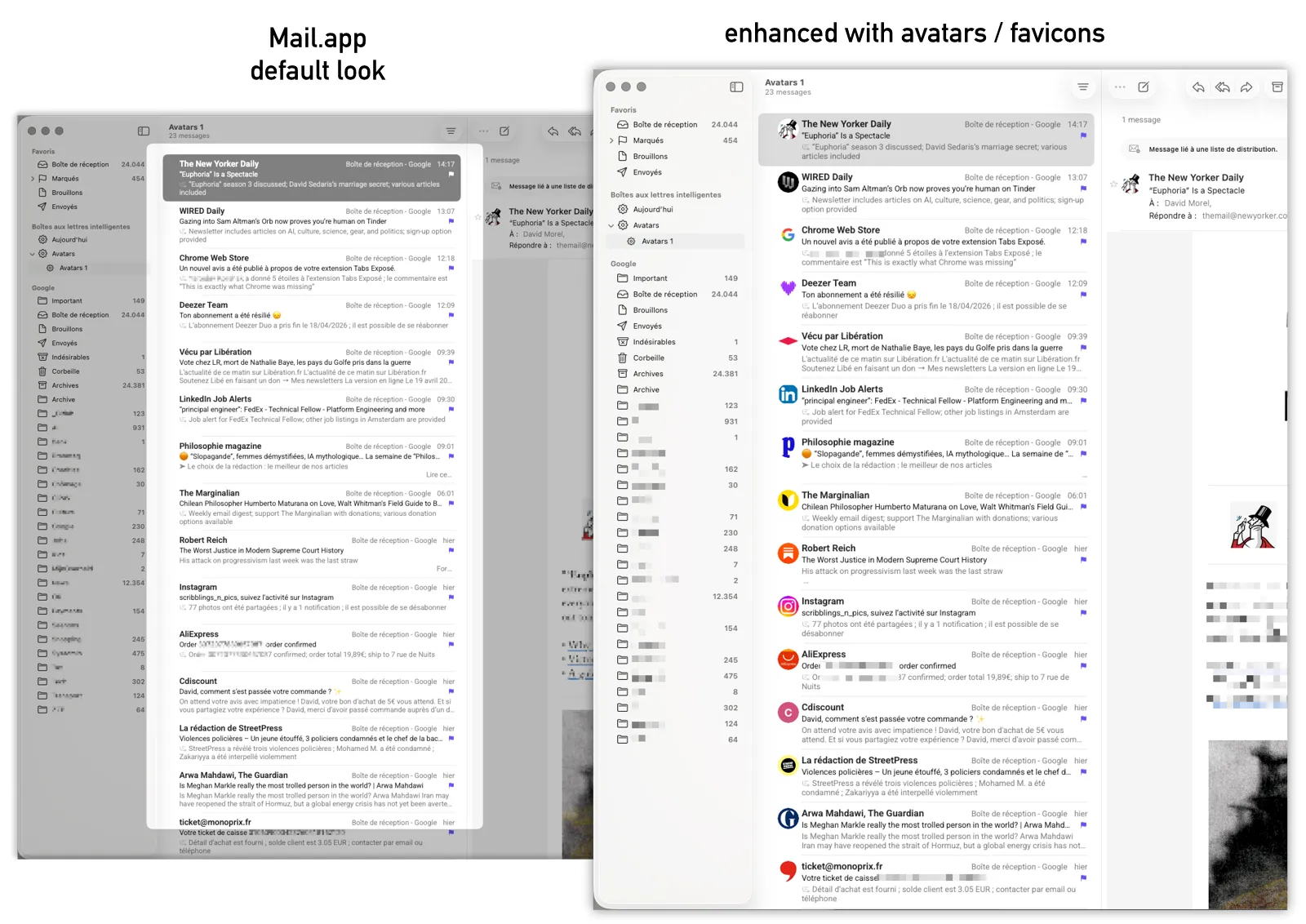
For years my Mail.app inbox had been a wall of grey silhouettes. I knew who all these people and companies were — I just wasn’t seeing them. Other mail clients (Hey, Spark, Superhuman) show avatars by default, but they all do it by sending the address book to their servers. Apple Mail doesn’t, and I’d rather it didn’t. So I built MailAvatars: scan Apple Mail locally, fetch an avatar for each sender, preview, write the approved ones into a dedicated Contacts group. Mail.app picks them up automatically.
Direct SQLite over the official AppleScript path
Apple Mail’s official scripting interface is AppleScript and Scripting Bridge, both painfully slow on real-world inbox sizes — about 400× slower than reading the underlying SQLite Envelope Index directly. The app reaches into ~/Library/Mail/V10/MailData/Envelope Index and queries it as a database.
The cost is requiring Full Disk Access. The benefit is that the scan finishes in under a second instead of several minutes, which is the threshold between “tool I open occasionally” and “tool I never get around to opening”.
A tiered avatar source chain
Per sender, the resolver walks: Gravatar → DuckDuckGo → Google S2 favicons → Apple Touch Icon → HTML page scrape → /favicon.ico → BIMI DNS records. Each fallback handles a different shape of “what does an avatar look like for this address”.
A single source isn’t enough on its own — Gravatar covers a few percent of senders, brand-logo APIs miss small companies, favicons exist but are sometimes 16-pixel pixel-art junk. The chain lands on whatever’s actually usable for each address.
Generic mail providers (gmail.com, outlook.com, laposte.net, ~70 others) are explicitly not mapped to brand logos. These are personal inboxes, and a generic G-logo would be misleading.
Preview before apply
Every candidate row shows the resolved avatar, display name, and message count. Uncheck any you don’t want. Nothing is written until Apply. This sounds basic, but for an app that mutates Contacts it’s the design decision the whole rest of the trust model rests on.
Container picker, with opinions
Contacts can go to On My Mac, iCloud, Google CardDAV, or Exchange. The picker labels each: Local is best, iCloud is fine, Google CardDAV gets an “avoid” label because of a long-standing macOS race condition that wipes avatar fields shortly after creation.
Opinions in the UI cost very little to add and save the user a few hours of “why is my avatar disappearing” debugging later.
Was it worth it?
Swift 6 with strict concurrency, SwiftUI, zero external dependencies, signed and notarised so Gatekeeper lets it in cleanly. The performance tuning was more satisfying than expected. The inbox has faces now, and the people I email regularly are immediately recognisable.
dmorel69/mailavatars— Swift, SwiftUI, MIT